Required info for sending email and text
What contact details and permissions are required for email and text
SetHero can send your call sheet to cast and crew by email and text, but first each person needs up-to-date contact information and permissions in their profile.
Required information
Each delivery method has its own requirements, and a person doesn't need both.
To receive email, a contact's profile needs:
- An Email Address
- Allow email sending turned on
To receive text messages, a contact's profile needs:
- A Phone Number, with the correct country code selected
- Allow SMS sending turned on
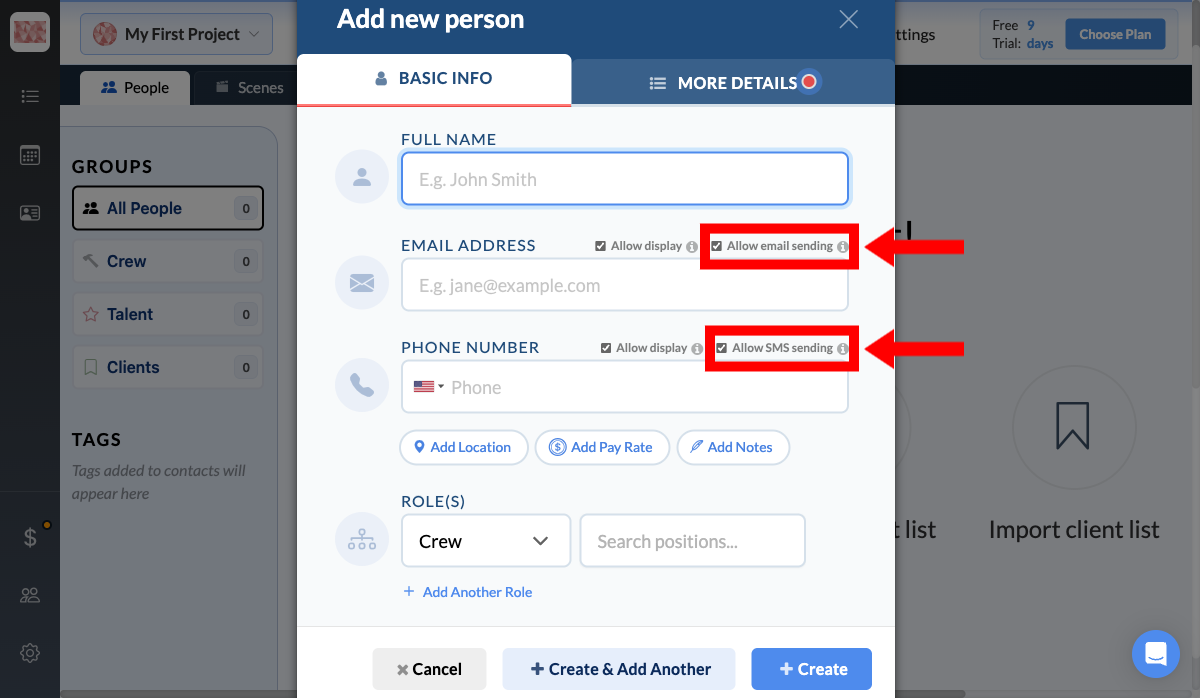
Note: By turning on SMS or email, you confirm you have the person's permission to send them notifications. The first text someone receives tells them they can reply STOP to opt out. Emails don't include an unsubscribe link, so if someone asks to stop receiving emails, turn off Allow email sending for them.
Update contact information
You can update these details at any time from the Contacts page. Open a person's profile (or create a new contact), go to the Basic Info tab, fill in the details for each method you want to use, turn on its permission toggle, then select Save.
If a contact is missing the required information for a channel, SetHero skips them on that channel when you publish.
Stop sending to one person
To stop emails or texts going to someone, turn off Allow email sending or Allow SMS sending in their profile. You can also use the Allow Emails and Allow Texts switches in your project's people list. SetHero then skips that person on that channel when you publish, and you can turn the switch back on at any time.