Refunds and billing mistakes
Request a refund and fix duplicate or unexpected charges
If a charge wasn't what you meant to buy, contact us. In most cases, we'll refund the incorrect charge so you can purchase the right option instead.
Important: You must request a refund within 7 days of the invoice date. Annual plans aren't refundable part-way through the year, and we don't prorate unused months. The same 7-day window applies to the annual charge.
Request a refund
Message support from inside SetHero using the chat bubble in the bottom-right corner of the app, or email support@sethero.com.
Include the following so we can find the charge:
- The receipt number from the subject line of your receipt email: "Your SetHero receipt [#…]." If you don't have the email, look the charge up under Past Invoices.
- The project name, or the company name for a subscription charge.
- What you intended to purchase, if you bought the wrong option.
After we process the refund, allow 5 to 7 business days for it to appear on your card or bank statement. Your bank sets that timing, not SetHero.
Does a refund cancel my subscription?
No. A refund only returns the money for one charge. Your subscription keeps running and will bill again on its normal schedule.
If you also want the subscription stopped, say so in the same support message, or cancel it yourself — Cancel your subscription walks through that.
Common billing mistakes
I upgraded the wrong project
Upgrades can't be moved from one project to another. There's no way to transfer the paid people, days, or size to a different project.
Instead, contact us within the 7-day window. We'll refund the upgrade on the wrong project, and you can purchase the upgrade on the correct one.
I chose the wrong billing type
If you purchased a subscription when you wanted a single project — or the reverse — contact us within the 7-day window. We'll refund the incorrect charge, switch the company's billing type, and re-bill you for the option you actually wanted. Subscription or per-project billing: which one and how to switch explains the difference between the two and how switching works.
I was charged twice
Send us the receipt numbers for both charges. We'll refund the duplicate and leave the correct charge in place.
I bought extra people or days by mistake
Add-ons purchased through Add Extra People / Days are refundable on the same 7-day terms as anything else.
Tell us which project and which add-on the refund is for. The extra people and days come back off the project when we refund them, the same way cancelled shoot days do, so the project's limits drop back to where they were before the purchase.
I was charged after my plan should have ended
Subscriptions renew automatically until you cancel them. Nothing expires on its own at the end of a term.
SetHero sends a reminder email a few days before each renewal, with the date and the amount you'll be charged, so the renewal itself isn't the first notice. If the renewal still caught you out, the 7-day window runs from the renewal invoice date. Payment card, renewals, and invoices covers the renewal emails in more detail.
I cancelled shoot days
Support may be able to credit cancelled shoot days, but the days have to come off the schedule. That lowers the project's day limit by the same number, so you can't keep them as spare capacity and get a credit too.
Contact support with the project name and which days you cancelled.
Why did I receive the same invoice email more than once?
You are not being charged each time. There are two normal reasons for it:
- An invoice is being reprocessed, usually after a refund or after a switch between subscription and per-project billing. Each pass sends its own email.
- An invoice is unpaid and the billing system is sending reminders until the card goes through. If the card keeps failing, the upgrade or plan is reverted until the payment clears, so update the card on Company Billing to stop the emails.
To confirm what actually hit your card, open View Past Invoices and compare the invoice list with the emails. If they don't match, send us the receipt numbers.
Find your invoices
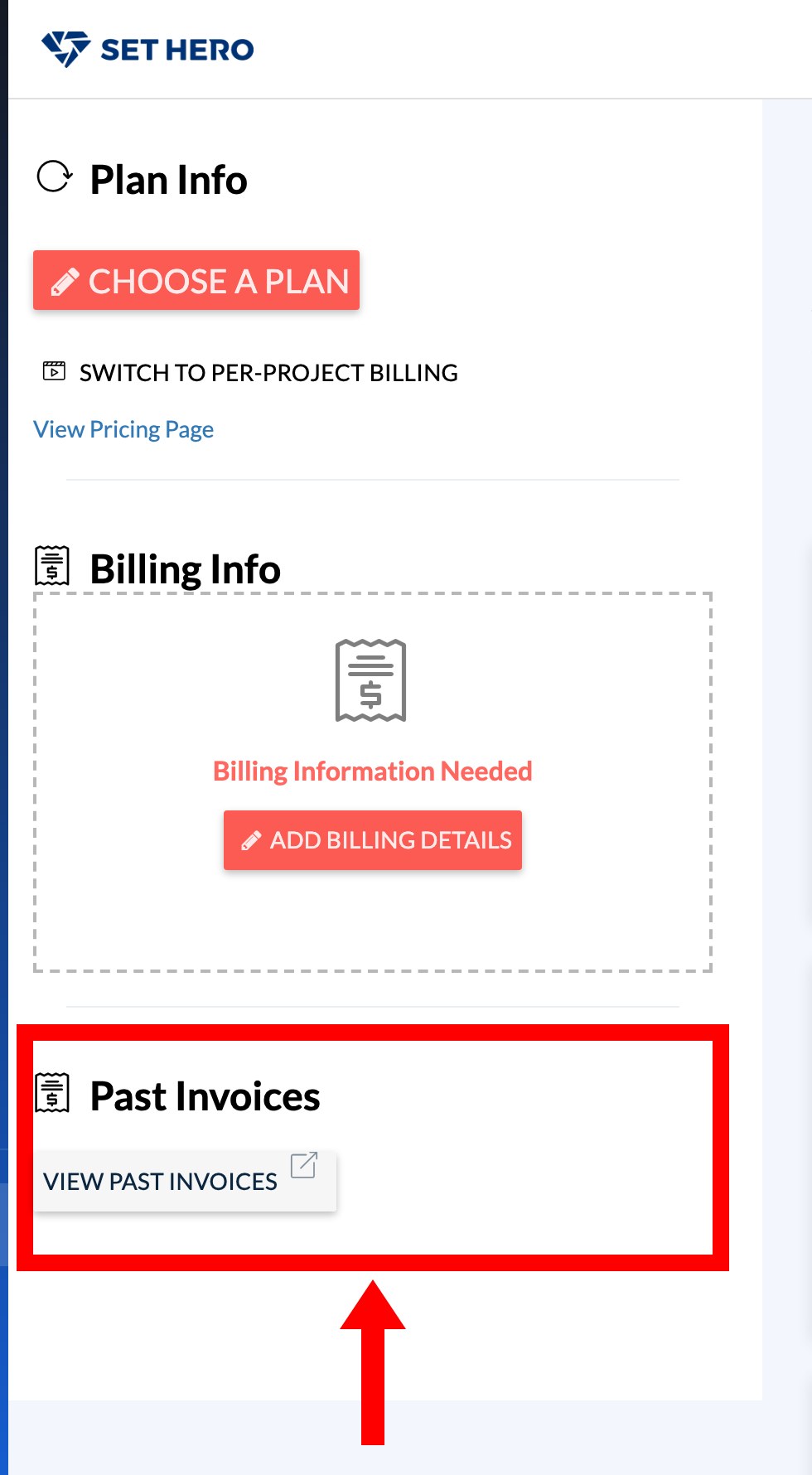
Open Company Billing and click View Past Invoices in the Past Invoices card. The billing portal opens in a new window, where every invoice and receipt for the company is listed. It opens as a popup, so allow popups for SetHero if nothing appears. If you see "Failed to log in to billing portal", send us the project or company name and we'll pull the invoices for you. Billing basics shows the rest of that page.