Cancel your subscription
Cancel your subscription, see what changes, and resubscribe later
You can cancel a SetHero subscription yourself from Company Billing, without emailing anyone. Cancelling stops the plan and future charges, but it does not remove anything you created in SetHero.
Note: Cancelling never deletes data. Your projects, contacts, call sheets, and production reports stay in your account and stay editable. What stops is publishing, scheduling new sends, PDF downloads from the editor, and Excel export. You can re-subscribe whenever you want — your card and billing details stay on file, so coming back is picking a plan again. If you want the data gone as well, that is a different action — see Delete your SetHero account.
Cancel your company subscription
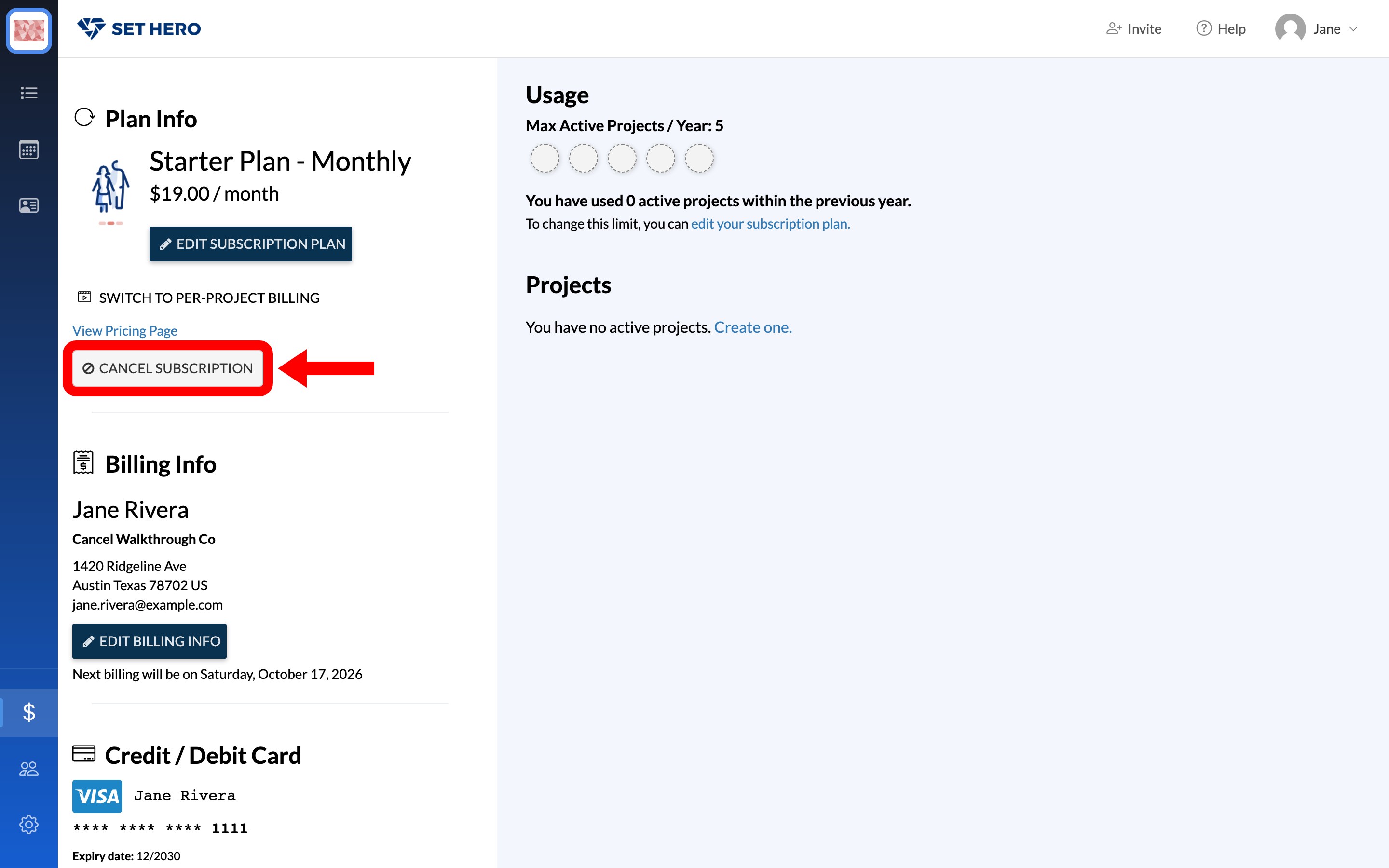
Open Company Billing from the dollar icon at the bottom of the left rail — Billing basics shows the way in. Cancel Subscription sits at the bottom of the Plan Info card.
-
Click Cancel Subscription. It opens a two-step wizard: Feedback, then Confirm.
-
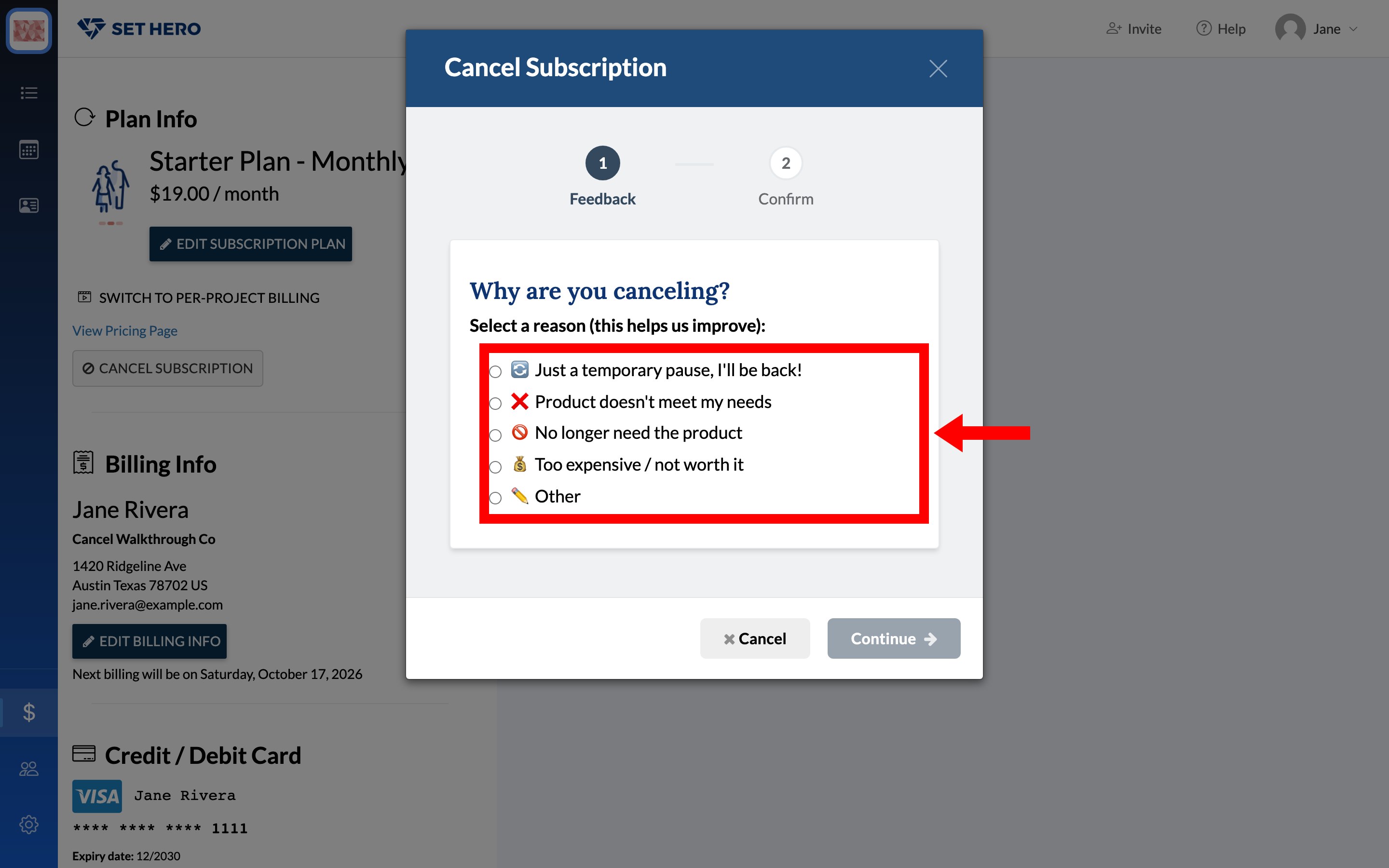
On the Why are you canceling? screen, pick one of the five reasons: Just a temporary pause, I'll be back!, Product doesn't meet my needs, No longer need the product, Too expensive / not worth it, or Other. Continue stays greyed out until you pick one, and Other asks you to type something in Please tell us more first.
-
If you picked Product doesn't meet my needs, a Tell us more screen asks What specifically wasn't working for you? The other four reasons skip this screen.
-
Depending on your reason, the wizard may show an offer before it lets you finish. To keep cancelling, click No thanks, cancel my subscription at the bottom of the offer.
-
On Confirm Cancellation, tick I understand my subscription will be cancelled immediately, then click the red Confirm Cancellation button. The screen reads: "Your subscription will be cancelled immediately and you will no longer be able to publish call sheets or production reports."
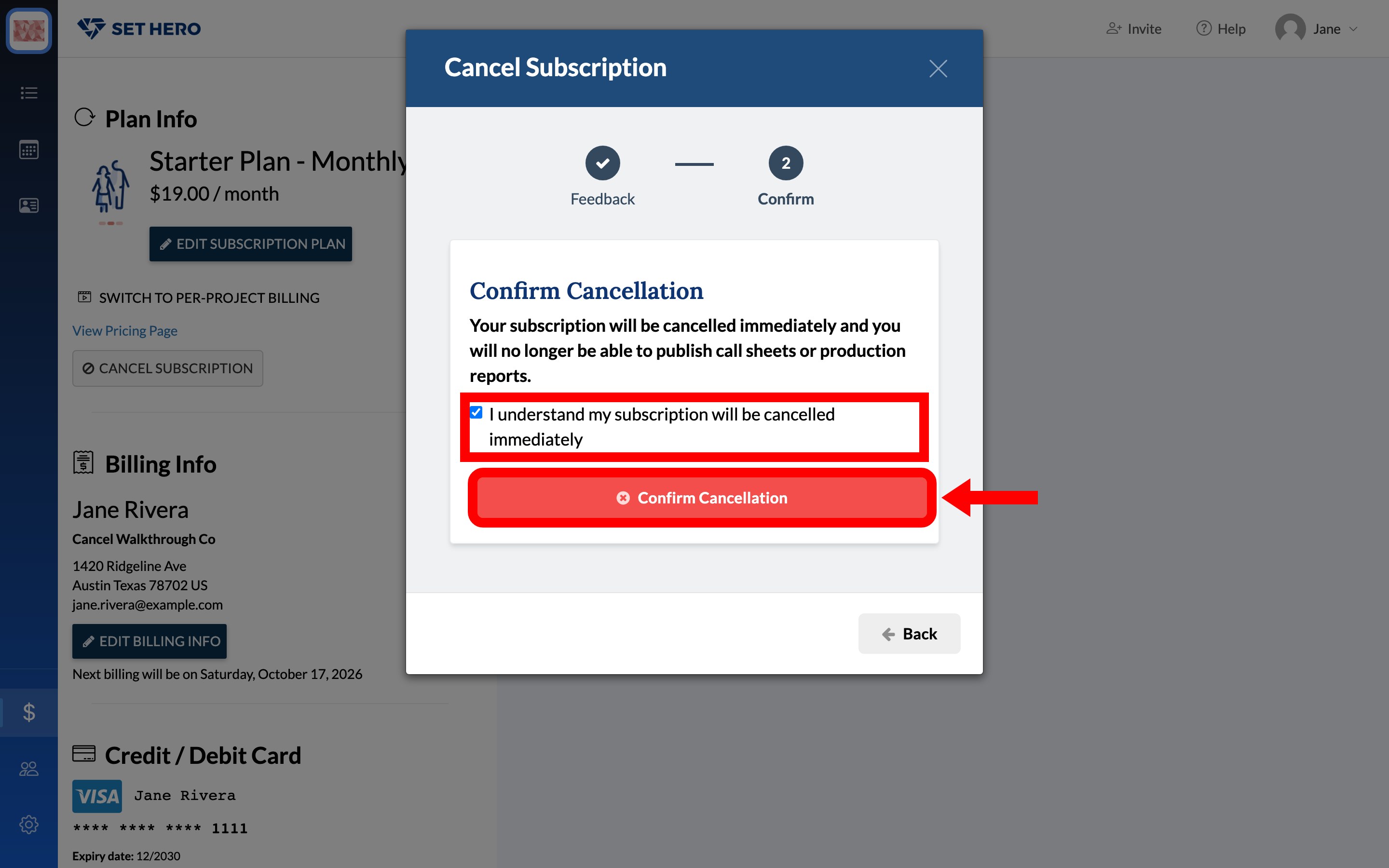
The plan ends there and then. You get a "Plan cancelled successfully!" message, and the page reloads with Choose A Plan back in the Plan Info card.
The Cancel button in the wizard footer only closes the wizard and leaves your subscription alone — it is not the button that cancels your plan.
Warning: Cancellation is immediate, not at the end of your current billing period. You lose access to publishing as soon as you confirm, and unused time is not credited automatically.
You don't need to be the company owner to cancel. Roles, admins, and permissions explained covers what else membership lets people do.
The cancellation option is only available for standard paid subscriptions — Subscription plans explained covers those. If Plan Info shows Choose A Plan, there is no subscription to cancel. If you use per-project billing, there is no company-level subscription either; see the weekly project plan section below. Companies on a fixed or invoiced arrangement do not get the button at all — the Plan Info card asks you to contact support to change the plan.
What happens after you cancel
Cancelling takes effect immediately and removes the company's people, day, and yearly project allowances.
What stays available
- All projects, contacts, call sheets, and production reports remain unchanged. Nothing is archived or deleted.
- You can continue viewing and editing your content.
- Previously published call sheets remain published, and existing links continue to work.
- Scheduled sends already queued before cancellation still go out at their scheduled time.
What stops working
Until you choose another plan, you cannot:
- Publish new call sheets or production reports (Publish and send a call sheet).
- Schedule new call sheets to send later (Schedule a call sheet to send later).
- Download call sheets or production reports as PDFs from the editor, or export them to Excel (Export a call sheet to PDF or Excel).
When you try one of those, SetHero shows the upgrade prompt instead, with a link back to the billing page. Call sheets you already published can still be opened with View PDF.
Free projects can still publish and download PDFs, but they can't export call sheets to Excel. Projects with separately purchased people or day allowances also keep those allowances after the company subscription is cancelled — that allowance belongs to the project, not the plan. They can publish only if those allowances cover both the project's people and its days.
If you only need to unblock one project, you can buy a one-time project upgrade instead of starting another subscription. The company stays on subscription billing after you cancel, so SetHero first asks you to switch it to per-project billing with a Switch & Continue step. See Upgrade a single project and Subscription or per-project billing: which one and how to switch.
Refunds for unused time
Cancelling does not automatically refund the unused part of a monthly or annual billing period.
Refund requests are handled separately and are normally limited to seven days from the invoice date. Cancelling partway through an annual plan does not create a prorated refund. Refunds and billing mistakes explains the window and what to send us if you think you were charged in error.
Resubscribe later
You can resubscribe at any time from Company Billing. Click Choose A Plan in the Plan Info card, pick a plan in the chooser, and confirm it on the Review Order screen. Your existing card and billing details remain on file, so you only need to choose a new plan — see Payment card, renewals, and invoices.
Cancel a weekly project plan
A long-form project on the weekly Pay-As-You-Shoot plan has its own subscription, separate from the company plan. Cancel it from the project's card in Company Billing rather than from Plan Info.
Click Cancel next to the weekly price on that card. A small Cancel Subscription dialog asks "Are you sure you want to cancel this subscription?" with Nevermind and Cancel Subscription.
Confirming ends weekly billing immediately and removes the project's people and day allowances, including anything purchased earlier. You will not be able to publish it until you upgrade it again.
Cancelling is not deleting your account
These actions have different results:
- Cancelling a subscription stops billing while keeping your companies, projects, contacts, call sheets, and reports.
- Deleting your account cancels subscriptions for every company you own and permanently removes those companies and their data. This cannot be undone.
If you only want to stop paying, cancel the subscription rather than deleting your account. The delete flow itself offers "I'd like to just pause my billing" as an alternative for exactly this reason.
MMS to Excel billing
The MMS to Excel exporter is purchased and billed separately, with its own payment page. Cancelling your SetHero subscription does not cancel the exporter or its charges. MMS to Excel exporter billing covers how that one is billed.